BufferedMutator is meant for batched, potentially asynchronous puts into a single table. This class relies heavily on AsyncProcess, which I has explained here. Then, we can focus on what BufferedMutator does in this post.
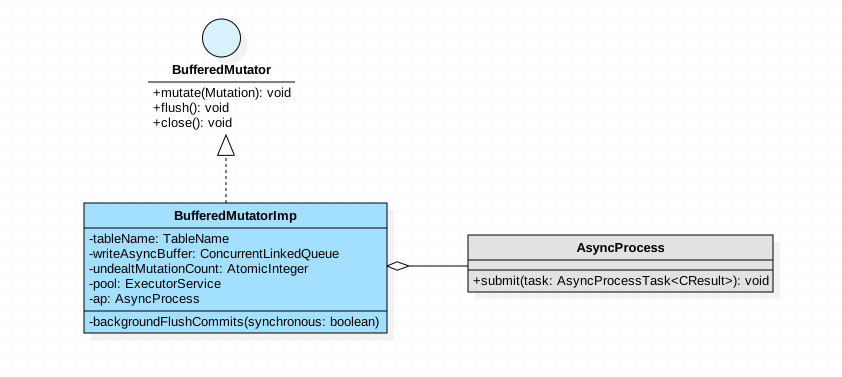
Fields Link to heading
TableName tableName.BufferedMutatoris used to communicate with a single HBase table. TheTableNameis store as private field.ConcurrentLinkedQueue<Mutation> writeAsyncBuffer. A linked queue with each itemMutation.AtomicLong currentWriteBufferSize. The size ofwriteAsyncBuffer.ExecutorService pool.Will be used inAsyncProcessto handle flush task.AsyncProcess ap. Submit tasks to this field.
Methods Link to heading
After obtaining an BufferedMutator instance from a Connection, Some Mutations are sent to one table by calling mutate method.
// BufferedMutatorImpl.java

  @Override
  public void mutate(List<? extends Mutation> ms) throws InterruptedIOException,
      RetriesExhaustedWithDetailsException {

    if (closed) {
      throw new IllegalStateException("Cannot put when the BufferedMutator is closed.");
    }

    long toAddSize = 0;
    int toAddCount = 0;
    for (Mutation m : ms) {
      if (m instanceof Put) {
        validatePut((Put) m);
      }
      toAddSize += m.heapSize();
      ++toAddCount;
    }

    // This behavior is highly non-intuitive... it does not protect us against
    // 94-incompatible behavior, which is a timing issue because hasError, the below code
    // and setter of hasError are not synchronized. Perhaps it should be removed.
    if (ap.hasError()) {
      currentWriteBufferSize.addAndGet(toAddSize);
      writeAsyncBuffer.addAll(ms);
      undealtMutationCount.addAndGet(toAddCount);
      backgroundFlushCommits(true);
    } else {
      currentWriteBufferSize.addAndGet(toAddSize);
      writeAsyncBuffer.addAll(ms);
      undealtMutationCount.addAndGet(toAddCount);
    }

    // Now try and queue what needs to be queued.
    while (undealtMutationCount.get() != 0
        && currentWriteBufferSize.get() > writeBufferSize) {
      backgroundFlushCommits(false);
    }
  }
The code is fussy, here is a quick list,
- Validate put, whether the
maxKeyValueSizeis exceeded? - Add all mutations to buffer queue and update its size.
- Flush if surpass write buffer size.
Step 3 should refers to private backgroundFlushCommits, which sends the operations in the buffer to the servers, of course with the help of AsyncProcess. What backgroundFlushCommits does is submitting task to AsyncProcess, just like HTable.batch().
// BufferedMutatorImpl.java

 private void backgroundFlushCommits(boolean synchronous) throws
      InterruptedIOException,
      RetriesExhaustedWithDetailsException {
    if (!synchronous && writeAsyncBuffer.isEmpty()) {
      return;
    }

    if (!synchronous) {
      QueueRowAccess taker = new QueueRowAccess();
      AsyncProcessTask task = wrapAsyncProcessTask(taker);
      try {
        ap.submit(task);
        if (ap.hasError()) {
          LOG.debug(tableName + ": One or more of the operations have failed -"
              + " waiting for all operation in progress to finish (successfully or not)");
        }
      } finally {
        taker.restoreRemainder();
      }
    }
    if (synchronous || ap.hasError()) {
      QueueRowAccess taker = new QueueRowAccess();
      AsyncProcessTask task = wrapAsyncProcessTask(taker);
      try {
        while (!taker.isEmpty()) {
          ap.submit(task);
          taker.reset();
        }
      } finally {
        taker.restoreRemainder();
      }
      RetriesExhaustedWithDetailsException error =
          ap.waitForAllPreviousOpsAndReset(null, tableName);
      if (error != null) {
        if (listener == null) {
          throw error;
        } else {
          this.listener.onException(error, this);
        }
      }
    }
  }
Thereafter, the following steps can be found in HBase Batch Puts without BufferedMutator .